Geomagic Wrap
3D Scan Processing, Meshing & Surfacing
Turn point clouds and raw scan data into clean meshes and surface models for downstream use.
Software, Training & Application Support from CAMS Across Canada & North America

BUILD CLEAN, USABLE 3D DATA FROM SCANS
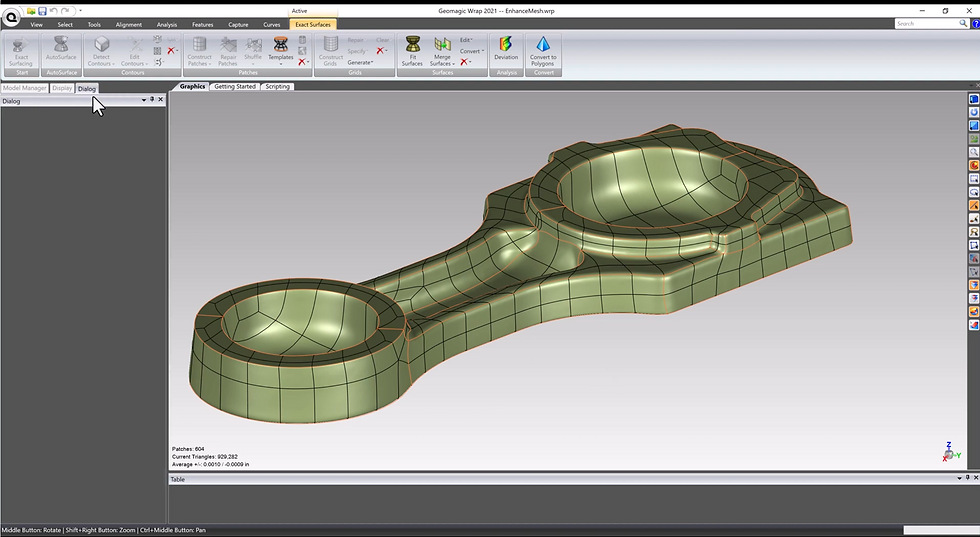
Geomagic Wrap is focused on processing point clouds and meshes into usable 3D models. Scan data can be aligned, cleaned, repaired and simplified, then developed into watertight polygon geometry or fitted NURBS surfaces for downstream work.
That makes Wrap useful for scan-to-mesh work, digital archiving, visualization, organic surfacing, 3D printing preparation and other projects where the captured form itself needs to be preserved. Colour and texture can also remain part of the model when appearance is important to the downstream workflow.
SCAN DATA APPLICATIONS
Image Title

EXPLORE RELATED SOFTWARE
USE WRAP WHEN THE DELIVERABLE IS THE CAPTURED FORM
Not every scan needs to become parametric CAD. Artwork, artifacts, anatomical forms and other irregular geometry may be better delivered as a cleaned mesh, watertight polygon model or fitted NURBS surface that preserves the measured shape.
Wrap is useful when the next step is 3D printing, visualization, archiving, milling or further freeform design. Scripting and macros can standardize repeated cleanup or surfacing tasks while still allowing manual control where individual datasets need it.